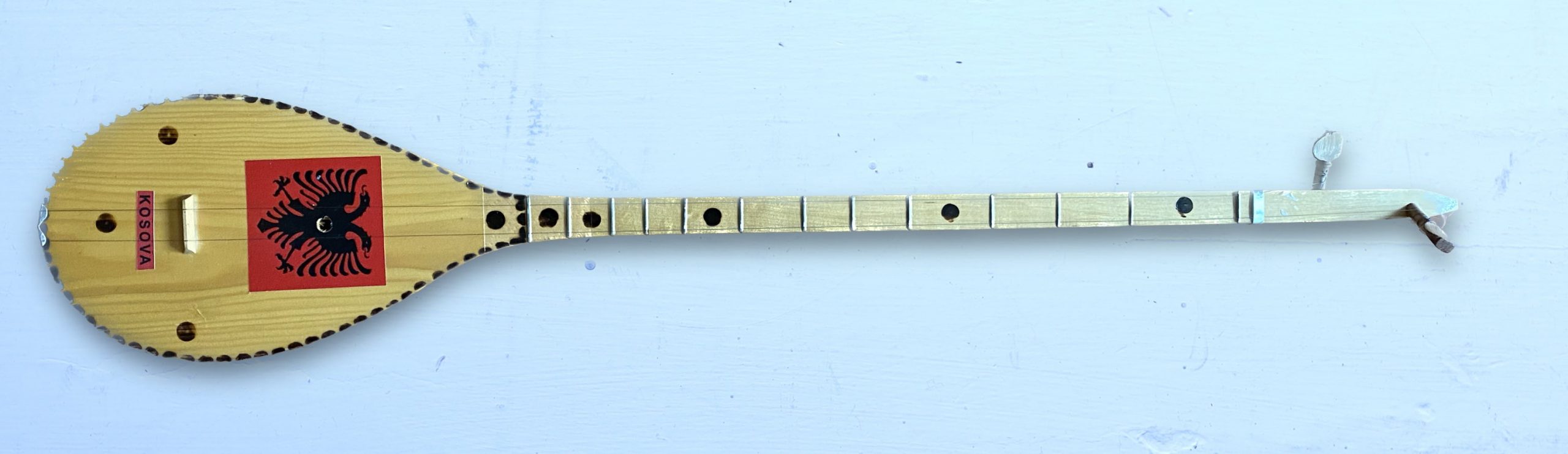
Over the past few months, several people have asked me if I could add microtuning support to Decent Sampler. This week, after purchasing a çifteli (pictured above) at a local thrift shop and discovering its unique scale, I finally decided to roll up my sleeves and see what I could do.
There is a new version (1.8.0) of Decent Sampler available here. It will be officially released on Monday, February 27th. This new version introduces the Tuning menu. This menu allows you load Scala (.scl) and Keyboard Mapping (.kbm files). It also allows you to specify a non-440Hz frequency for MIDI Note 69:
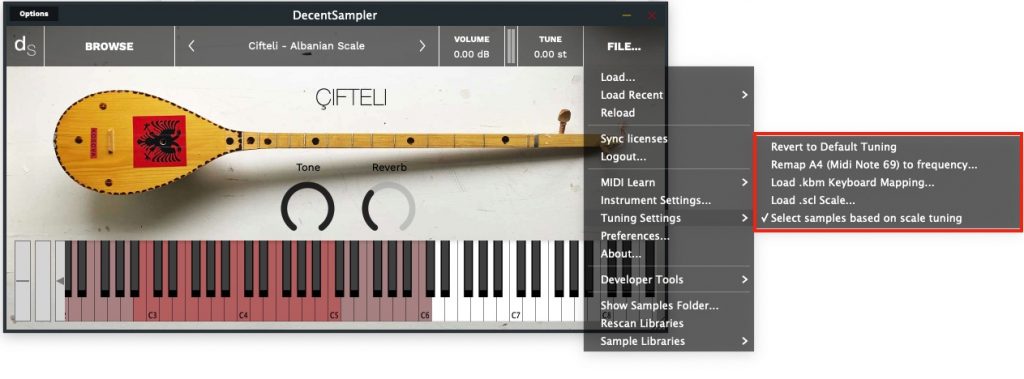
In order to use the microtuning functionality, you will need to get ahold of the .scl and .kbm files for the scale you are interested in. A great place to download a bunch of scales is here (look for the Download them all link in the Tuning Files section). Once you have those, you can load them using the Load .kbm Keyoard Mapping… and/or the Load.scl Scale… menu options.
When you specify a scale or keyboard mapping, your scale and keyboard mapping will get saved along with the DAW session. However, if you create a new track and put Decent Sampler on that track, the new track will revert back to the classic twelve-tone scale that most DS users expect. This is by design, but if someone thinks this behavior should be changed, let me know.
Sample creators can also embed scales in their instruments by adding a “tuningSclFile” and/or “tuningKbmFile” attributes to their top-level <DecentSampler> elements.
I want to thank the kind developers over at Surge synth for making their microtuning library available to all developers and for licensing it so generously. Without this, I would not have added microtuning support.
This is very much my first foray into the world of microtuning, so I expect that users will have suggestions. There will doubtless be a version 1.8.1 and a version 1.8.2. Let me know what you think!
– Dave
EDIT: I’ve updated the screenshot above to show the new version of the Tuning menu.
Hi hi! Checked 1.8.0 and 1.8.1. First of all, retuning per se seems without any issue. At least if checking with just an ear.
But alas the sample map, like in sforzando, stays fixed as it was, so when using a tuning with 7 or 17 notes per octave, samples at ends of the playing range get retuned too much, with effect on timbre and sample length (too long and muffled on one end, too short and bright on another, which being which depends on if there are more or fewer notes than 12).
As I said in comments to that other older post (in probably hardly a clear way—but I’ll try better this time) it can be fixed quite readily—barring some issues which are probably not fixable in an automatic way and better left to the user (more about that below).
The actual keymap in the .dspreset file stays the same, with MIDI notes for starts and ends of each sample’s range. But it’s interpreted differently when retuned: when you got a new frequency F for each MIDI note N, you also calculate “an actual MIDI note” Ñ (which would generally be fractional now), looking what MIDI note would give F in standard tuning. (See the formula below if I’m too wordy here.) You then use this Ñ to determine if a note lies in a range of a particular sample (or group; I haven’t yet looked too much into the format).
Let’s say if a range of sample S1 is from 60 to 64, then range of sample S2 is from 65 to 68. They are with no gap when we use standard tuning, so we want them be without a gap in any other tuning; the natural thing to do then is to use S1 for Ñ ranging from 60 − ½ to 64 + ½, and S2 for Ñ from 65 − ½ to 68 + ½. We have a slight collision at the border 64 + ½ = 65 − ½, and I think it should be okay to resolve this ambiguity in any way: always using a sample with the lower range, or always using one with the higher range—or any simple way you deem convenient.
If you precompute which sample is used for which MIDI note (N → sample-id), you’d probably be good with precomputing this new “concrete map” each time frequencies of notes change, computing N → Ñ → sample-id. (And if Ñ is out of any defined range, it’s unplayable.)
If playing ranges grow outside our meager MIDI1 note range of 0…127, then so be it; musicians using keyboard retuning method are already accustomed to this (and it can be made okay when using KBM files which allow to focus on a part of a range, so it’s nice the Surge library allowed you to already have both 👏 👍). So you don’t even need to check which range from .dspreset maps to which range in retuned MIDI notes (maybe only to show a warning somewhere in a log if you wish!).
[Calculating Ñ in terms of F]
As one calculates the frequency of a MIDI note N in standard tuning as F = 440 Hz × 2^((N − 69) / 12), then reversing this (and using Ñ in place of N) gives this:
Ñ = 69 + 12 × log2(F / 440 Hz)
(just in case C++ math library doesn’t have log2(x), it’s log(x) / log(2) but you probably already know).
About keyswitches (this is that problem I think is better left for a user to solve): now as ranges would sometimes grow, they can intersect one or more keyswitches. Which are probably should stay in place on the keyboard for their convenience! But if you want to experiment, you can add a checkbox for shifting keyswitches too as if they were normal notes. But I’d make this an opt-in because it seems a weird behavior. Staying in place is not conveinent too when the range grows, but this is that case I think only the user would know where to place the keyswitch to make themselves content. So again, probably flashing a warning somewhere—“beware this keyswitch redefines one of notes now in playing range, you may want to edit the preset file!”—and hoping they would be ready for that occasion as they used a scale with many notes per octave and probably knew what to expect from that!
At least that’s the best I came up with.
Again, thank you David very much for working on this feature! 🎈 Believe or not, this is in a sense history because, well, when ever would Plogue be able to patch sforzando? They said they’ll first make a successor to ARIA and then make sforzando use that new engine and it could support MPE. As of better sample mapping, I probably was too cryptic and wordy and they haven’t yer answered about that at all. (They are cool, I’m just stating the state of affairs.) Another one sampler, TX16Wx can be retuned by MTS-ESP but again the sample mapping issue is the same. And there are probably no other freeware samplers sophisticated enough and supporting major formats (as input or import).
Another thing: how is the state of things with FLAC, do you have time×motivation for that? For some reason I expected importing SFZ libraries with FLAC samples would work and was a bit surprised what the errors were about (I thought there was something with file paths and edited them two times before getting a clue). But this is another issue; and I already added a little comment on the QA question about FLAC so no worries. I think I have space for WAV for now. 😀
Let me know if I forgot to elaborate anything I said here I would and then forgot. I hope the trick with “actual MIDI note” Ñ is understandable because I may be explaining it in a weird way.
Version 1.8.3 added a new menu option: “Select samples based on scale tuning.” Is this what you were hoping for?
Aaaaah!! That’s so cool!! 🙌 Yep that’s exactly it.
Thank you yet again!
BTW a little cosmetic fix which you probably already noted can be added to note colors in the on-screen piano keyboard to reflect the new range of playing when this switch is on. If it wouldn’t be too hard, as it’s more than fine already. (I think.)
I downloaded the .scl and .kbl files that I wanted from my computer and put them in an iCloud Drive folder, but when I try to load them in IOS, they appear greyed out. Is there something I am doing wrong, or is microtonality not possible in IOS? When I use Decent Sampler on my Mac, it all works fine.
Hi! yes, you should be able to load them via the “File > Tuning > Load SCL File…” menu option. 🙂
When I try to do that, the files are greyed out. Here is an image of my problem: https://imgur.com/gallery/eWxcSGg
Thanks for the heads up. I’ve created a bug report here: https://www.decentsamples.com/bugtracker/view.php?id=21
Hi! Can you spell out the Çifteli’s Albanian scale explicitly? According to my understanding it’s maqam husayni on B, which according to my (very limited) understanding of Turkish music is B C+ D E F# G+ A, where the regular notes are generated from a chain of fifths where each fifth is 31 steps of 53-tone equal temperament, a sharp symbol is 5 steps and a plus is one step, which means the steps are 5-8-9-9-5-8-9 from B to B and the notes are 5, 13, 22, 31, 36, 44 and 53 steps (i.e. 113.207547, 294.339623, 498.113208, 701.886792, 815.09434, 996.226415 and 1200 cents) above B or 9, 14, 22, 31, 36, 44 and 53 steps (i.e. 203.773585, 316.981132, 498.113208, 701.886792, 815.09434, 996.226415 and 1200 cents) above E.
Is that what you found as well? If not, what is the scale you used?
Thanks!
Hi!
The frequencies I measured are here: https://docs.google.com/spreadsheets/d/1fmBBgdx5bz5IIsOPfTpm6kMjn1V359KaxTcRut_VAqE/edit?usp=sharing
Fret    Note    Frequency

Open    E4                  329

1       F#4                 370

2       between G4 and G#4  400

3       A4                  440

4       B4                  494

5       between C5 and C#5  539

6       D5                  585

7       E5                  657

8       F#5                 739

9       between G5 and G#5  800

10      A5                  880

11      B5                  988
Very interesting, so the “G+” is about 1 step of 53 above what I expected and the “C+” is 2, which makes a step pattern of 7-6-9-9-6-7-9 from B to B.
For anyone interested, I’ll also write here an scl file:
! çifteli.scl
The scale of an Albanian çifteli, as measured by David Hilowitz, as a subscale of 53edo, above the drone string
7
!
158.490566
294.339623
498.113208
701.886792
837.735849
996.226415
1200.0
Very interesting! I believe i am missing something however. Does this allow for the “retuning” of existing samples to say, a 432hz equal temperment scale? I find setting the A4 note to 440 and clicking ok does nothing, and upon revisiting the menu, the note is still set to 440. I do assume this is my mistake or misunderstanding, so any information would be fantastic.
Hmm, I just tested it and it seems that that functionality is broken. I’m going to try to fix it now.
Hi,
I have loaded Roee Sinai’s çifteli.scl into Pianoteq’s classical guitar and played it together with the Albanian tuned çifteli.
Unfortunately, çifteli.scl does not match the Albanian tuned çifteli.
Does anyone know where to get an scl file for the Albanian tuning (Makam Hüseyni) that does match Decent Sampler’s Albanian tuned çifteli?
Regards,
Ralf
If I’m not mistaken, makams/maqams of the same name can have noticeable differences between different traditions in different countries so I’m not sure there is a sure way to get it right without recording your çifteli and looking at the pitches. Moreover a Western notion of an unique start of the scale has complications there and maybe the scale file is okay but you just need to set A4 frequency to something else. Also note that the scale up there is just 7 notes long, not 12 notes: on the physical keyboard one octave would be from C to G (then from G to D and so on—one fifth of “real notes” will represent an octave). The SCL file can be tweaked to better correspond to a physical keyboard, one just has to duplicate pitches, replacing everything from “7” to “1200.0” with these lines:
12
!
158.490566
158.490566
294.339623
294.339623
498.113208
701.886792
701.886792
837.735849
837.735849
996.226415
996.226415
1200.0
Also, if what I glanced [here](https://www.sufi.gen.tr/makamlar/en/huseyni), which is the Turkish variant, represents the tuning of the instrument, it translates into a following SCL file (if I’m reading accidentals correctly!):
! makam-hüseyni.scl
Turkish makam Hüseyni, 8 13 22 31 39 44 53 steps in 53edo
7
!
181.132075
294.339623
498.113208
701.886792
883.018868
996.226415
2/1
This only works if the scale start (which will be on middle C by default) is what was notated as A on that page. If the start should be on E (a half-note as notated), then steps are instead 8 13 22 30 35 44 53 of 53edo which means 702¢ and 883¢ entries above should be replaced with 679.245283 and 792.452830. That would be a scale without a fifth on the starting note, so I preferred the first option (A to A) here.
The topic is still out of my depth so I hope you tried asking in maqam and microtonality communities.
Still not practical in decent sampler because in some music you need to switch on/off certain notes in the same piece of music. It is much easier to do in Kontakt
Hey this is a bit unrelated but I’ve been looking all day trying to find a solution. Sometimes I’d like to jam in Decentsampler standalone without plugging in my equipment, just with my keyboard (typing). It seems to be stuck at C7 and I can’t figure out how to remap it to c3 or something else more sensible.
Is there a way to do this? I don’t always want to load up a lot of stuff and get my instruments out to jam. Thanks so much!
So, it’s not documented anywhere, but you can actually switch octaves with the ‘z’ and ‘x’ keys.
BTW knew about this feature but it didn’t occur to me that others may be oblivious: I tried using Z and X after Vital (uses Z and X) and Surge XT (uses X and C because Z is for undo, I think). At least I think it was because of them that I tried them some time ago and was delighted it worked in DS too!
Hi once more! I gathered this post will be an appropriate place to ask if there any plans to support tuning with MTS-ESP. It allows for instruments to get retuned in real time. An important thing that makes implementation easier is the instrument doesn’t have to retune already playing voices when new tuning data comes up—it may, or it can have a toggle for that mode, but just using the tuning effective at the start of a note is completely okay so maybe that would make fitting this into DS a little bit easier.
Again I haven’t accrued any experience of this sort of coding to give any useful advice myself but Surge XT folks most probably would help! (I semi-checked.)
Further on MTS-ESP, two things to keep in mind…
One is that the standard is itself open. (There has been some confusion on this.)
The other is that the list of tools supporting it keeps growing.
https://oddsound.com/usingmtsesp.php
The reason this second one matters is that there’s a lot of value in using these tools together, using MTS-ESP to tune them together. It’s a bit like Ableton Link, in a strange way. You synchronize tuning the way you might synchronize beats.
Yes, we understand the challenge in mapping. Not insurmountable.
Might do some experiments with Entonal Studio’s MPE mode to check how well it deals with DecentSampler. Internal support would be way better, as should be obvious. Tackling the mapping issue through an indirect test could make sense.